快速开始
跑通"列出虚拟卡卡头"是验证鉴权链路最快的方式(无副作用、不需要幂等键)。
1. 准备凭证
通过用户控制台生成一对凭证:
APP_ID:cp_+ 28 位 hex 字符(共 31 字符)SECRET:64 位 hex 字符
妥善保管
SECRET 仅在生成时返回一次,丢失只能 reset。建议保存到密钥管理服务(KMS / Vault / GCP Secret Manager)。
2. 拷贝下面的脚本
bash
APP_ID="cp_a1b2c3d4..."
SECRET="f1e2d3c4..."
BASE="https://api.coinepay.net"
PATH_VAL="/api/v1/openapi/card_headers/list"
BODY='{"page":1,"page_size":20}'

TS=$(date +%s)
NONCE=$(openssl rand -hex 16)
BODY_HASH=$(echo -n "$BODY" | openssl dgst -sha256 -hex | awk '{print $2}')
SIGN_INPUT=$(printf 'POST\n%s\n\n%s\n%s\n%s' "$PATH_VAL" "$TS" "$NONCE" "$BODY_HASH")
SIG=$(echo -n "$SIGN_INPUT" | openssl dgst -sha256 -hmac "$SECRET" -hex | awk '{print $2}')

curl -X POST "$BASE$PATH_VAL" \
  -H "X-App-Id: $APP_ID" \
  -H "X-Timestamp: $TS" \
  -H "X-Nonce: $NONCE" \
  -H "X-Signature: $SIG" \
  -H "Content-Type: application/json" \
-d "$BODY"python
import time, hmac, hashlib, secrets, json, requests

APP_ID = "cp_a1b2c3d4..."
SECRET = "f1e2d3c4..."
BASE = "https://api.coinepay.net"
PATH = "/api/v1/openapi/card_headers/list"
BODY = json.dumps({"page": 1, "page_size": 20}, separators=(",", ":")).encode()

ts = str(int(time.time()))
nonce = secrets.token_hex(16)
body_hash = hashlib.sha256(BODY).hexdigest()
sign_input = f"POST\n{PATH}\n\n{ts}\n{nonce}\n{body_hash}"
sig = hmac.new(SECRET.encode(), sign_input.encode(), hashlib.sha256).hexdigest()

r = requests.post(BASE + PATH, headers={
    "X-App-Id": APP_ID, "X-Timestamp": ts, "X-Nonce": nonce, "X-Signature": sig,
    "Content-Type": "application/json",
}, data=BODY)
print(r.json())js
import crypto from 'node:crypto'

const APP_ID = 'cp_a1b2c3d4...'
const SECRET = 'f1e2d3c4...'
const BASE = 'https://api.coinepay.net'
const PATH = '/api/v1/openapi/card_headers/list'
const body = JSON.stringify({ page: 1, page_size: 20 })

const ts = Math.floor(Date.now() / 1000).toString()
const nonce = crypto.randomBytes(16).toString('hex')
const bodyHash = crypto.createHash('sha256').update(body).digest('hex')
const signInput = `POST\n${PATH}\n\n${ts}\n${nonce}\n${bodyHash}`
const sig = crypto.createHmac('sha256', SECRET).update(signInput).digest('hex')

const res = await fetch(BASE + PATH, {
  method: 'POST',
  headers: {
    'X-App-Id': APP_ID, 'X-Timestamp': ts, 'X-Nonce': nonce, 'X-Signature': sig,
    'Content-Type': 'application/json',
  },
  body,
})
console.log(await res.json())3. 期望响应
json
{
  "code": 200,
  "message": "成功",
  "data": {
    "list": [
      {
        "header_id": "hdr_5",
        "card_bin": "424242",
        "card_brand": "VISA",
        "card_area": "美国",
        "business_scene": "境外消费",
        "description": { "zh-CN": "适合电商订阅", "en-US": "For e-commerce subscriptions" },
        "features": ["3DS", "EMV"],
        "require_phone": false,
        "require_email": true
      }
    ],
    "total": 12,
    "page": 1,
    "page_size": 20,
    "total_pages": 1,
    "has_next": false,
    "has_prev": false
  }
}4. 完整开卡流程
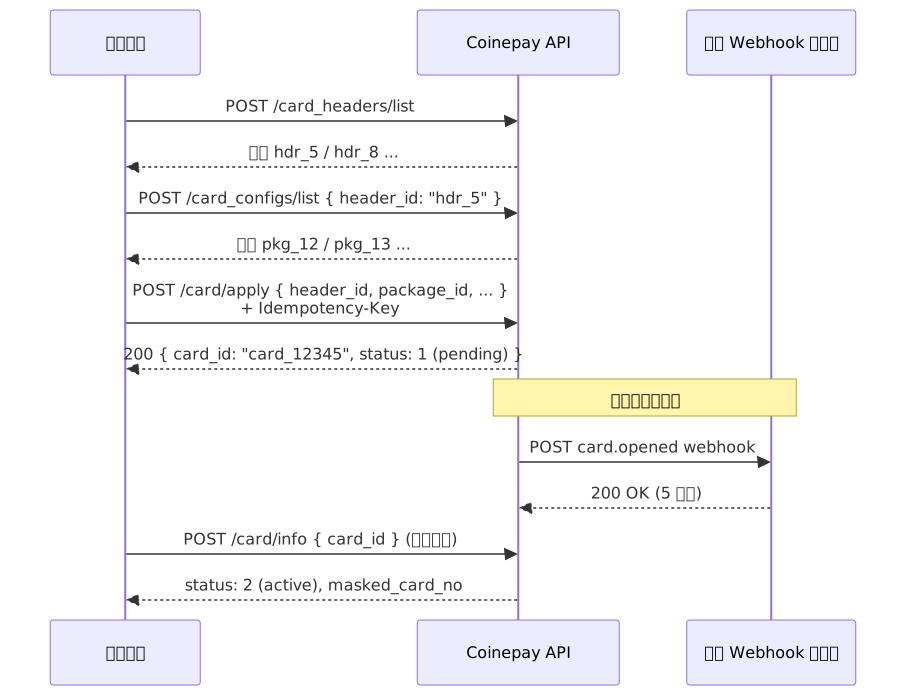
5. 常见错误
| 现象 | 原因 |
|---|---|
| 401 invalid_credentials | 签名错 / 时间戳过期 / nonce 重放 / AppID 不存在 |
| 400 openapi_idempotency_key_required | 写接口未传 Idempotency-Key 头 |
| 409 openapi_idempotency_key_conflict | 同 key 不同 body |
| 429 | 触发限流(600 次/分钟) |
详见 错误码字典。
下一步
- HMAC 鉴权 — 把签名规范读完,避免奇怪的 401
- Webhook 规范 — 接收开卡完成等异步事件
- 代码样例 — Python / Go / Java / PHP 完整客户端